Orto: License Plate VIN Lookup
- 4.5
- Rating
- 500.00K
- Installs
- Free
- Price

 Analysis by App-foxy
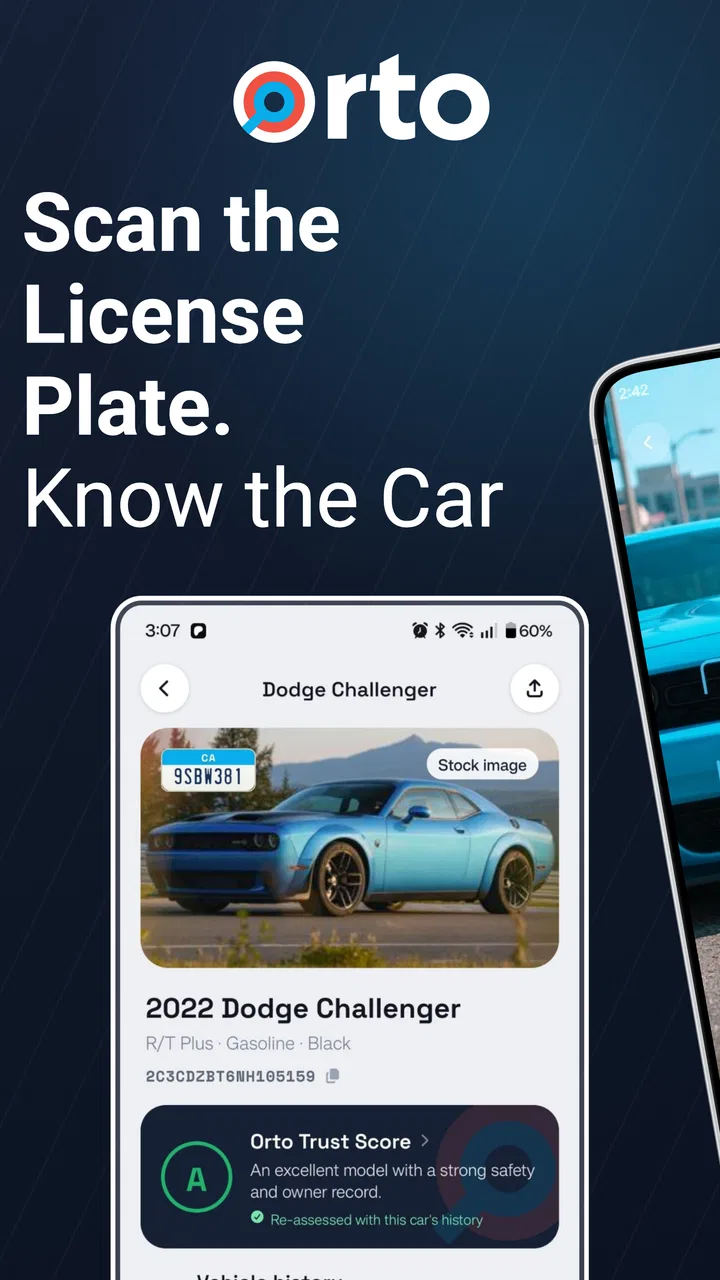
I usually install vehicle-history apps for one reason: I want a quick answer before a small car decision becomes an expensive mistake. Orto: License Plate VIN Lookup takes that practical approach, combining VIN decoding and license plate lookup in an Auto & Vehicles app from Orto Industries LLC. It is free to install, aimed at Everyone, and its core appeal is simple: enter identifying information about a vehicle and use the resulting details to investigate title history, recalls, value, and related records.
After spending time with it, my view is that Orto is most useful as a repeatable checking tool rather than a novelty lookup app. The first search is naturally the most exciting, especially when I am looking at a used vehicle, but the real question is whether it remains useful after that initial curiosity. In my experience, it can earn a place on a phone when I regularly compare cars, shop privately, or want a second check before committing to a purchase. It is less compelling for someone who rarely deals with vehicles and expects one app to replace a mechanic, an inspection, and every official record.
From a quick lookup to a buying routine
When I move from checking one interesting listing to comparing several serious options, I find that a consistent routine matters more than collecting the most reports. I would decide in advance what makes a car worth further investigation, then use each lookup to answer that question before spending more time or money. That approach makes it easier to see how the app fits into a longer ownership and shopping cycle.
You May Also Like

 Blood Strike: 2.5 Anniversary
Blood Strike’s Loadouts Turn Every Drop Into a Tactical Gamble
A close look at Blood Strike’s custom loadouts: how fast access to signature weapons reshapes its battle royale rhythm, rewards preparation, and narrows the gap between fights.

 Pandora - Music & Podcasts
Pandora’s Music Is Easy to Start, but Harder to Recover
Pandora’s strength is its low-effort path from a seed to a station. Its weak spot is how much confidence it asks you to place in connection, setup, and quiet recovery.

 8 Ball Pool
 Is Built on Rivalries, Rematches, and Routine
A close look at the rivalries, rematches, shared routines, and unanswered safety questions that turn a quick pool match into a persistent mobile community.

 Samsung Music
’s Quiet Strength Is Playing What You Already Own
Its reach comes less from spectacle than from dependable access to a personal library. That simplicity is both the app’s strongest retention engine and its ceiling.

 AccuWeather: Weather Radar
AccuWeather Review: A Quick, Clear Forecast for Everyday Decisions
For everyday plans, the best forecast is the one you can understand quickly. AccuWeather makes rain timing, radar, and local conditions easy to act on, with a few trade-offs.

 Hill Climb Racing
Why Hill Climb Racing Still Turns Crashes Into One More Run
A tiny car, a bumpy hill and one more upgrade: Hill Climb Racing keeps resurfacing because its simple chaos makes every near-miss feel personal.
More From Our News Desk



Why the first week feels useful
The app has an immediate advantage over a general web search: it organizes the task around the vehicle itself. Instead of searching scattered phrases such as “used car recall” or “license plate history,” I can begin with a VIN or plate lookup and treat the vehicle as the subject of the investigation. That makes the first session feel focused, especially when I am standing beside a car and need to decide what to check next.
VIN decoding is particularly helpful at the beginning of a review because it gives me a structured starting point. A seller’s description can be incomplete, loosely worded, or simply wrong. A decoder helps me compare the vehicle identity with what I can see in front of me: the model details, the physical condition, and the paperwork. I would not treat the result as proof that every part of the listing is accurate, but it is a useful way to spot questions before I spend more time negotiating.
The license plate option is valuable in a different situation. A plate is often easier to read or record than a VIN when I am browsing a car from a distance, reviewing a listing, or speaking with someone who has not yet sent all the documentation. That convenience can shorten the gap between “this car looks interesting” and “I know what information I still need.” It also gives the app a practical role before a formal inspection, not just after I already have complete paperwork.
During the first week, I would use Orto in a deliberately cautious order. I would record the vehicle identity, check the available history and recall information, note anything that conflicts with the seller’s story, and then ask for supporting documents. That workflow matters because a lookup is strongest as a screening step. It can tell me where to investigate, but it should not encourage me to skip a physical inspection, a test drive, or a conversation about maintenance.
How I would use it during an ordinary car search
Imagine I am comparing two older cars after work. One seller provides a VIN immediately; the other only shares a plate number. I can use Orto to begin both checks instead of waiting for the second seller to respond with more details. If one result raises a question about title history, recalls, or value, I can spend my limited time on that vehicle first rather than treating both options as equally promising.
The useful insight here is not simply that the app can look up a vehicle. It is that the two input routes support different stages of a purchase. A plate lookup is convenient for early screening, while a VIN-based check is better suited to confirming that the exact vehicle in front of me matches the vehicle being discussed. Switching between those stages helps prevent a common mistake: researching a similar vehicle and assuming the result applies to the one I might buy.
I would also keep my own notes outside the app. For each candidate, I would record the date of the search, the seller’s claims, the visible odometer reading, and any questions raised by the result. This turns a one-off lookup into a comparison process. It is a small habit, but it makes the app more useful because I am not relying on memory when several cars begin to blur together.
What the first search cannot settle
Orto is not a substitute for a qualified mechanic. A clean-looking history result cannot reveal every current mechanical problem, and a recall result does not tell me whether the vehicle has been maintained well. I would still inspect the tires, brakes, fluids, warning lights, body repairs, and underbody condition. I would also verify the paperwork directly, particularly when a private seller is asking me to make a quick decision.
The same caution applies to value information. A value estimate can help me judge whether a price deserves more discussion, but it is not an automatic buying instruction. Condition, location, mileage, equipment, ownership history, and urgency can all change what a specific car is worth. I see the value feature as a negotiation reference, not as a precise promise of the price I should pay or expect.
Why it can remain useful after the novelty fades
The app’s lasting value comes from repeated decisions, not from repeatedly looking up the same vehicle for entertainment. If I buy and sell cars often, help family members shop, or compare several listings over time, a dedicated lookup tool is easier to return to than a collection of browser tabs. Its focus keeps the task narrow, which is exactly what I want when I am trying to answer one practical question quickly.
That recurring value is strongest for people who need a pre-purchase filter. A dealer, frequent private buyer, or automotive enthusiast may use the same basic sequence again and again: identify, check, compare, question, and inspect. For those users, the app can become part of a checklist. The benefit is not that one search solves everything; it is that the same safety-minded process becomes easier to repeat.
For an occasional driver, the calculation is different. If I only buy a vehicle once every several years and already have trusted inspection and history services, Orto may feel unnecessary between purchases. I might install it for a single investigation, then remove it when the decision is over. That is not a failure of the app; it reflects how specialized the task is.
What long-term use feels like
With repeated use, I pay more attention to whether the process stays manageable than to the novelty of any single result. I would keep a simple record of which vehicles I checked and what still needs verification, so a quick search does not become a source of misplaced confidence. That longer view also helps me judge whether the app remains useful between purchases or is better kept for the next focused search.
The maintenance burden is mostly behavioral
Orto is relatively easy to keep useful because the main maintenance work is not technical housekeeping; it is disciplined interpretation. I need to keep the vehicle identity straight, save important results, and avoid confusing a preliminary lookup with a final verdict. The app can support the investigation, but I am responsible for connecting the result to the seller’s documents and the vehicle’s actual condition.
I would build a simple routine around every serious candidate. First, I would capture the VIN or plate exactly as shown. Next, I would review the available title, recall, history, and value information. Then I would write down anything that needs confirmation. Finally, I would compare the result with the physical car and the paperwork. This sequence prevents the common trap of opening an app, seeing a reassuring summary, and stopping before checking the details that matter most.
It is also worth checking the app’s current version before relying on it for an important purchase. The current version is 6.0.2, and the app supports Android 7.0 or later. That makes it accessible to many older Android phones, although I would still keep the app updated and test it before arriving at a viewing. A lookup tool is most frustrating when I discover a compatibility or access problem while standing in a seller’s driveway.
The app has been available since May 13, 2019, which gives it a more established feel than a brand-new utility that has not yet had time to prove its usefulness. Its audience is also substantial: it has passed 500 thousand installs, with an average rating of 4.5 from about 9.6 thousand ratings and roughly 4 thousand written reviews. Those figures do not guarantee that every lookup will suit every vehicle, but they suggest that the basic concept has found a real audience.
Where recurring costs can change the experience
Orto is free to install, which makes trying the workflow easy. However, in-app purchases range from $3.99 to $449.99 per item. That wide range is important to understand before I make the app part of a regular buying process. I would not assume that every useful result is included in the free experience, and I would review the purchase screen carefully before confirming anything.
The practical trade-off is straightforward. For one low-stakes lookup, I may decide that a paid result is worthwhile if it answers a question that could affect the purchase. For repeated research, I would keep a running budget and compare the cost of several reports with the cost of other history-checking options. The most expensive purchase range makes it especially important not to tap through quickly just because I am eager to see a result.
This is one of the app’s biggest long-term friction points. A free download feels low-risk, but vehicle research can become expensive when I check many candidates or repeatedly request detailed information. I would use the app first to narrow the field, then spend money only on vehicles that remain serious possibilities. That preserves the convenience without turning every casual listing into a paid investigation.
Sources of fatigue during repeated research
The first source of fatigue is repetition. Searching several cars can mean entering similar identifiers, comparing similar categories of information, and keeping track of which result belongs to which listing. The app helps centralize the lookup, but it does not remove the mental work of comparison. My advice is to label each vehicle in notes immediately, using a short nickname and the last part of its identifier, so I do not mix up two similar cars.
The second source is uncertainty. A result can raise a concern without explaining exactly what happened or what action I should take next. That is not a reason to ignore it. It is a signal to ask the seller for documentation, contact the relevant authority when appropriate, or arrange an inspection. Users who want a simple green-or-red answer may find this frustrating, while careful buyers will see the extra questions as part of the value.
The third source is the temptation to over-trust convenience. Because a plate lookup is fast, I might start treating it as a replacement for the VIN, title documents, or an inspection. I think that is the wrong habit. The best use of the plate option is early screening and the best use of VIN information is identity confirmation. Keeping those roles separate makes the app more dependable in practice.
There is also a privacy and accuracy consideration in any vehicle-identification workflow. I would enter only the information needed for the specific check, avoid sharing another person’s vehicle details casually, and verify that the result clearly refers to the vehicle I am researching. A rushed entry or an incorrectly copied identifier can produce a misleading trail, so taking a moment to double-check the characters is more valuable than rushing to the next screen.
Who gets the most from it
I would recommend Orto to people who regularly shop for used vehicles, compare private listings, help relatives evaluate cars, or want one focused place for VIN and plate research. It is especially useful for someone who needs a repeatable first-pass process and understands that the app is one layer of due diligence. The combination of identity checking, title and history research, recall awareness, and value context gives that type of user several reasons to return.
I would be more cautious about recommending it to someone who wants a definitive mechanical diagnosis, a guaranteed valuation, or a single report that removes the need for any further checking. It is also not the best fit for a driver who has no upcoming vehicle decision and dislikes managing possible in-app purchases. In those cases, an official recall source, a trusted mechanic, or a specialized service chosen for one particular need may be the better option.
Compared with ordinary web searches, Orto is more convenient because it puts the vehicle lookup at the center and supports both VIN and plate-based starting points. Compared with a mechanic, it is faster and cheaper as an initial filter, but it cannot inspect the car. Compared with a full history-report service, its appeal is the focused workflow and free entry point, while the variable in-app purchase costs mean I would compare the final report price and depth before making it my only research method.
My long-term verdict
After the first-week appeal wears off, I think Orto: License Plate VIN Lookup earns lasting space for the right kind of user. It is not an app I would open every day, but it can become a dependable part of a vehicle-buying checklist. The recurring value comes from helping me ask better questions earlier, especially when I am comparing multiple cars and do not yet know which one deserves an inspection.
My strongest recommendation is to use it as a funnel. Start with the least expensive and most convenient lookup available, eliminate vehicles that do not deserve more time, and reserve deeper spending for serious candidates. Keep notes, verify the exact vehicle identity, and treat title, recall, history, and value results as evidence rather than final answers. That approach reduces both wasted money and overconfidence.
Orto is free to install, rated for Everyone, and developed by Orto Industries LLC. Its 4.5 average rating and broad install base make it easy to understand why people try it, but my recommendation is based more on the workflow than on popularity. Its real strength is turning scattered vehicle research into a repeatable screening habit. If that is what I need, I would keep it installed. If I only want a one-time definitive report or a mechanical inspection, I would use a more specialized alternative instead.
FAQs for Orto: License Plate VIN Lookup
01What is Orto: License Plate VIN Lookup used for?
Orto: License Plate VIN Lookup is designed to help users research vehicle information using a license plate number or VIN, depending on the available search options and regional coverage. It may provide details such as vehicle identification data, specifications, registration-related information, or history reports. The exact results can vary significantly by country, database availability, and the information legally accessible in that region.
02Is Orto: License Plate VIN Lookup free to use?
The app may allow users to install it and access some basic features without an upfront payment, but certain searches, detailed reports, or premium tools can require in-app purchases or a subscription. Before ordering a report, review the displayed price, renewal terms, and what information is included. Availability and pricing may also differ between Android and iOS or according to your location.
03Can Orto provide complete and accurate vehicle history information?
No vehicle lookup application can guarantee a complete history for every car. Orto’s results depend on the databases, public records, commercial sources, and regional information available to the service. A report may not show accidents, repairs, theft records, ownership changes, or mileage issues that were never reported or are unavailable in the selected country. Use the results as a research aid, not as the only basis for buying a vehicle.
04Is it safe to enter a license plate number or VIN in the app?
A VIN is generally intended to identify a vehicle, while license plate information can be more sensitive depending on local privacy laws. Before using Orto, check its privacy policy, data-handling practices, requested permissions, and whether searches are stored or shared with third parties. Avoid entering personal information that is not necessary, and only use the service for lawful purposes, such as checking a vehicle you own or are considering purchasing.
05What should I do if Orto cannot find my vehicle or shows incorrect information?
First, verify that the VIN contains the correct 17 characters and that the license plate was entered exactly as required, including the correct country or state format. Some vehicles and regions may not be supported, and records can be incomplete or delayed. If the information still appears wrong, compare it with the vehicle documents and contact Orto’s support team. Do not rely on an unverified result when making a purchase or legal decision.
Pros
- Quickly retrieves vehicle details using a license plate or VIN.
- Useful for checking basic vehicle information before a purchase.
- Simple interface makes searches easy for most users.
- Can help identify possible inconsistencies in a vehicle’s history.
- Convenient mobile access without needing a desktop lookup service.
Cons
- Available data may vary significantly by country and region.
- Some detailed reports or searches may require payment.
- Results can be incomplete for older or privately registered vehicles.
- VIN entry errors can lead to inaccurate or failed searches.
- The app may collect search and device data
- depending on its privacy policy.

Orto: License Plate VIN Lookup
Gallery